Back to Management & Leadership
The HR Guide To A Smooth Office Technology Move
Written by: Tamara Siklosi
Tamara is a seasoned copywriter with a unique blend of legal expertise, business acumen, and a passion for writing.
Reviewed by: Keca Ward
As a seasoned HR professional with over 20 years of experience, Keca is an expert in various aspects of Human Resources.
Updated on August 18, 2026

Relocating an office involves much more than moving desks and furniture. Technology supports nearly every business function, from communication and payroll to collaboration and customer service. Human resources teams play an important role in helping employees prepare for these changes while minimizing disruption to productivity. Careful planning, clear communication, and coordinated execution can make the transition significantly smoother.
Prepare Technology Before Moving Day
Technology planning should begin well before equipment is packed. Creating a complete inventory of computers, monitors, phones, printers, networking equipment, and accessories helps prevent misplaced or damaged items during transportation.
Departments should identify essential systems that require minimal downtime, such as payroll platforms, communication tools, and employee management software. Assigning labels to equipment and documenting where each item will be installed at the new office also speeds up setup after the move.
Keep Employees Informed
Communication reduces uncertainty during an office relocation. Employees should receive a detailed timeline outlining packing schedules, temporary workflow adjustments, expected downtime, and instructions for reconnecting equipment after arrival.
HR teams can also provide checklists that explain how employees should prepare workstations, secure confidential documents, and label personal equipment. Clear expectations reduce confusion while helping everyone contribute to a more organized move.
Test Systems Before Full Operations Resume
After technology is installed, every critical system should be tested before normal business activities begin. Internet connectivity, email access, printers, conference room equipment, security systems, and communication platforms should all be verified.
Testing allows technical teams to identify and resolve issues before employees begin their workday. Departments should also confirm that shared drives, cloud applications, and collaboration software remain accessible from the new location.
Meeting rooms deserve special attention because presentation technology often involves multiple connected devices. Organizations working with commercial audio-visual services can help ensure conference systems, displays, microphones, and video conferencing equipment function properly before important meetings resume.
Protect Data Throughout the Move
Office relocations present opportunities for equipment loss, accidental damage, or unauthorized access to sensitive information. Computers, storage devices, and confidential records should be transported securely and remain under controlled supervision throughout the relocation.
Employees should avoid leaving devices unattended during packing and unpacking. Password protection, encryption, and secure backups further reduce the risk of data exposure if equipment is misplaced or damaged. HR departments should also remind employees to follow company security policies throughout the relocation process.
Support Employees During the Transition
Even a well-planned move creates temporary disruption. HR can help reduce stress by providing realistic timelines, encouraging patience during system testing, and ensuring employees know where to find technical support if problems arise.
Gathering employee feedback after the move also helps identify improvements for future relocations. Small adjustments made during the first few weeks often improve workflow while helping staff adapt more quickly to the new environment.
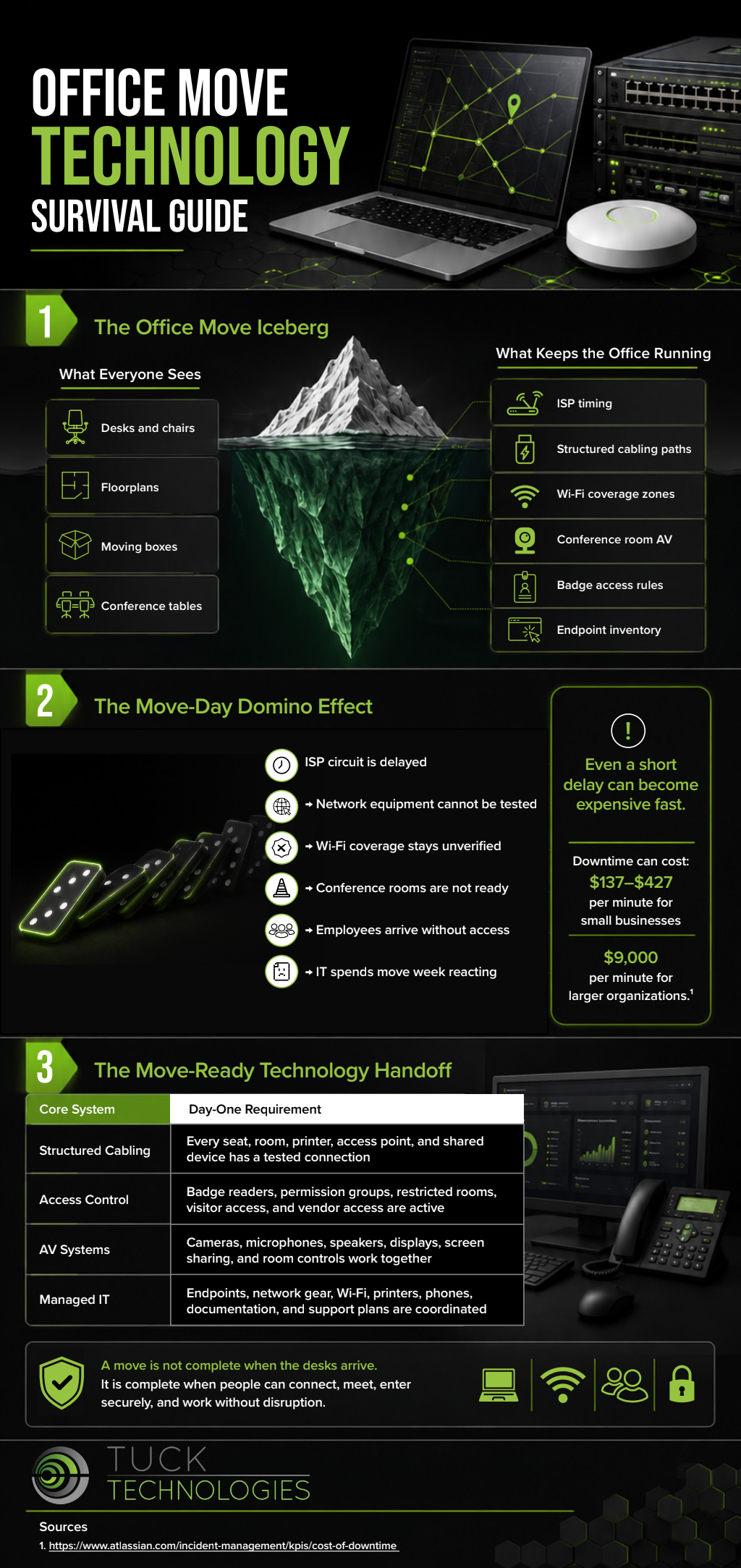
Successful office technology moves depend on preparation, communication, and careful coordination. By inventorying equipment, protecting business data, testing critical systems, and keeping employees informed throughout the process, HR teams help create a smoother transition with minimal disruption. Look over the infographic below to learn more.